For GoHighLevel agencies, consultants and the businesses they serve
A personalised GoHighLevel system, approved line by line.
Paste a website. usepicked drafts the pipeline, automations, messages, AI agents and knowledge base for that one business. You read and approve every line, then take it as a snapshot for any agency you control or have it installed straight into a sub-account you connect. It even runs inside the GoHighLevel sidebar.
Free account, no card required. Every paid plan starts with a one-week trial that includes a Build.
-
SMS · Missed-call recovery Drafted for you
Hi, this is Bright Smile Dental. Sorry we missed your call. Reply BOOK for a check-up slot this week, or we will call you back within 15 minutes.
-
Pipeline · 5 stages Drafted for you
- New enquiry
- Consult booked
- Treatment plan presented
- Accepted
- In treatment
-
Voice AI · Greeting Drafted for you
Thanks for calling Bright Smile Dental, this is Mia. Are you calling about a new appointment or an existing one?
-
Email · Treatment plan follow-up Drafted for you
Subject: Your treatment plan from Bright Smile Dental. Dr Patel has set out the options we discussed. Reply with any questions, or book your next visit in one tap.
-
Knowledge base · Opening hours Drafted for you
Monday to Friday 8:00 to 18:00, Saturday 9:00 to 13:00. Out of hours, call the emergency line on the website and a dentist will call back.
Nothing is approved by default. Tick each line to approve it.
Snapshot packaged and ready to import
Approved as version 1. One Build credit used. The import link lands in your workspace and inbox.
Try it: every line above is a draft until you tick it, exactly as in the product.
From website to working GoHighLevel account in four steps
A Build is one personalised system for one business. The wizard takes under an hour of your time; we do the rest.
-
1
Describe the business
Paste a website. We read it and propose services, hours, contacts and FAQs for you to confirm one by one. Then pick goals, lead sources and the automations the Build should ship with.
-
2
Review every draft
Pipeline stages, every SMS and email, the Voice AI and Conversation AI agents and the knowledge base are drafted for this business. Edit, ask for a rewrite, or approve. Nothing ships unapproved.
-
3
We build it in GoHighLevel
Approval freezes a versioned specification and uses one Build credit. Provisioning installs it into a temporary sub-account under our agency, step by step, with retries and no manual clicking.
-
4
Receive it your way
Import it as a snapshot into any agency you control, usually within one business day, or connect your agency and have the Build installed straight into a sub-account. Either way you get a checklist for the few connections only you can make.
Two ways to receive a Build, and one place to do it all from
The configuration is the same whichever route you pick; only the last mile changes. Both end with the same activation checklist.
Every plan
Snapshot you import
We build the account in a temporary sub-account under our agency and package it as a snapshot. The import link lands in your workspace and inbox, usually within one business day.
- Works with any agency you control
- No connection needed
- Temporary account deleted after delivery
Early access
Installed into your sub-account
Connect your agency, pick or create the sub-account on the Delivery step and load our base snapshot once. Approval then writes the Build straight into it, with nothing to package and nothing to wait for.
- Pick an existing sub-account or create one
- Readiness check before anything is written
- Revoke access at any time
Marketplace app
usepicked inside GoHighLevel
Install the app and usepicked appears in the GoHighLevel left navigation. Your GoHighLevel identity signs you in; no second password, and the same workspace as on the website.
- Agency and sub-account views
- Builds pre-targeted at the sub-account you are in
- Private tokens still supported
Step-by-step instructions for every route are in the setup guides.
Inside a Build
Every screen below is the real product. Scroll the list and the screenshot follows.
Start from the website, not a blank form
Give us the address and we crawl the site, extract services, locations, hours, offers, FAQs and tone, and show each one as a proposal. You confirm, edit or remove field by field.
The confirmed profile becomes the source every message, agent and knowledge base article is written from, so the names and words your customers know show up everywhere.
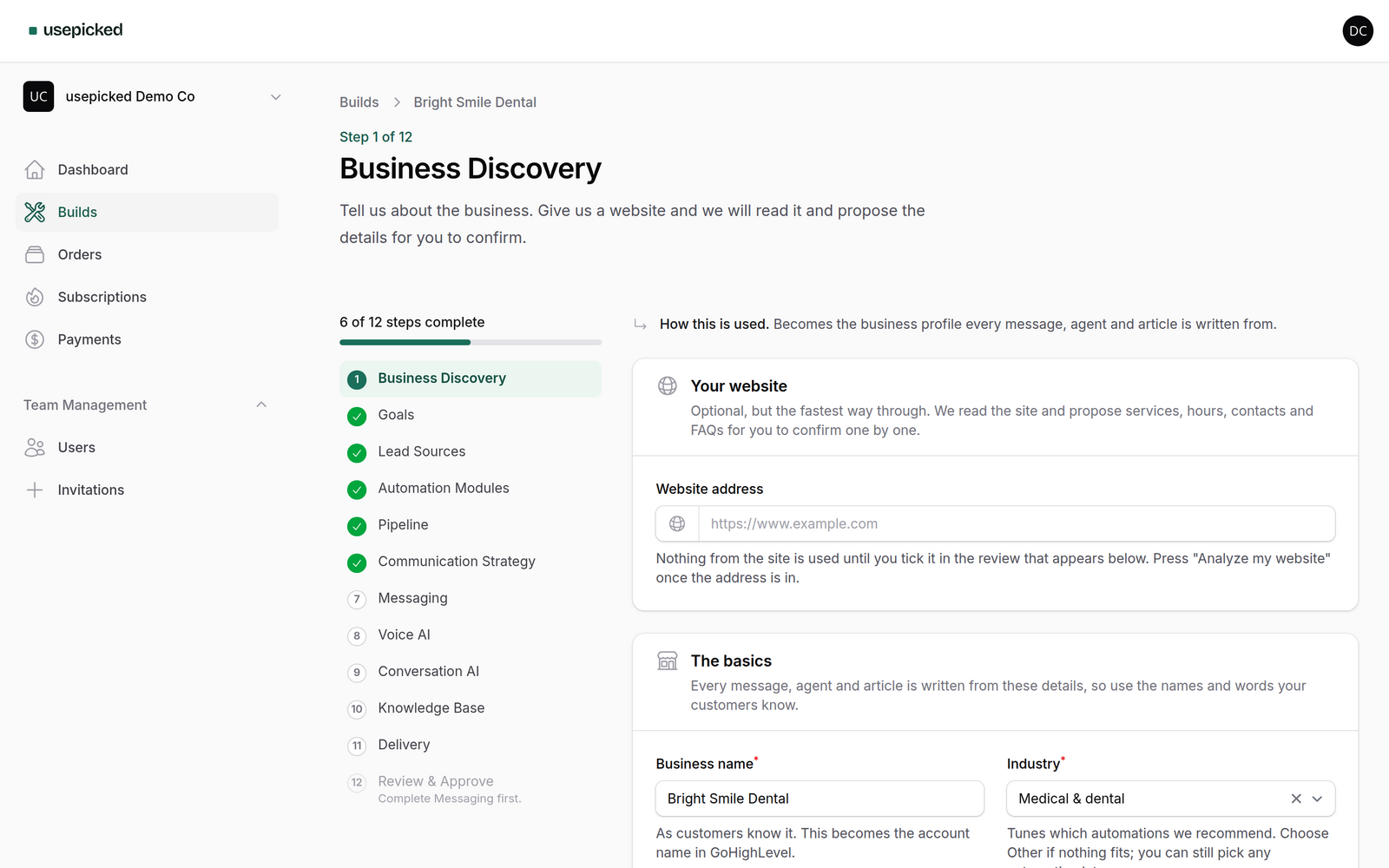
Pick the automations. We pre-tick the right ones
Each module is a proven GoHighLevel workflow from our master snapshot: missed-call recovery, instant lead response, booking, quote follow-up, review requests and more. Recommendations come from the goals, lead sources and industry you chose.
Every module you keep gets its own message drafts on the Messaging step and its own items on the activation checklist after import.
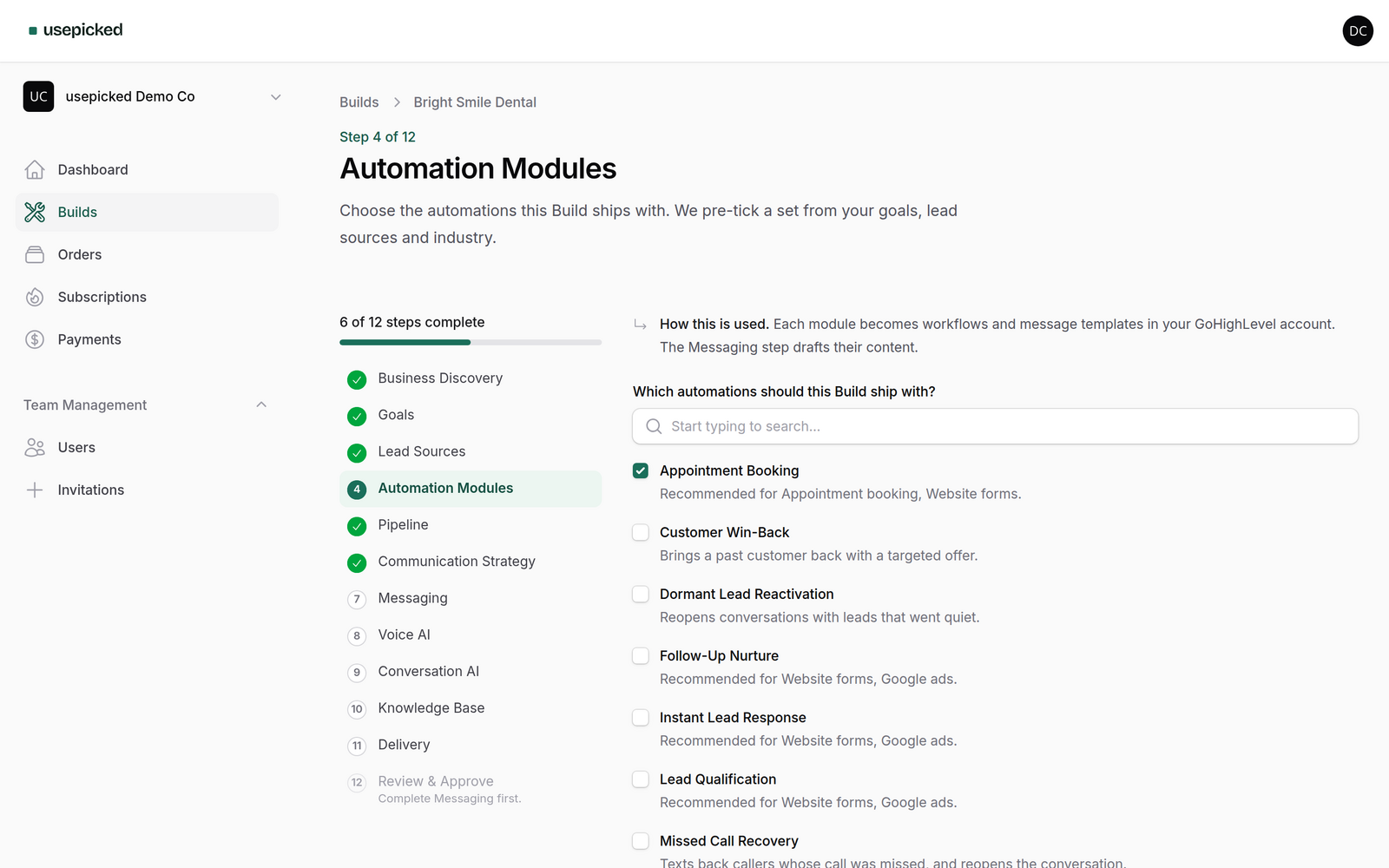
A pipeline drafted for the business, not copied from a template
Stages are proposed from the industry, sales model and goals. Rename, reorder, add or remove them until they match how the team actually works, or ask for a fresh draft.
The approved pipeline becomes the opportunity pipeline in the account, and the automations move leads between exactly these stages.
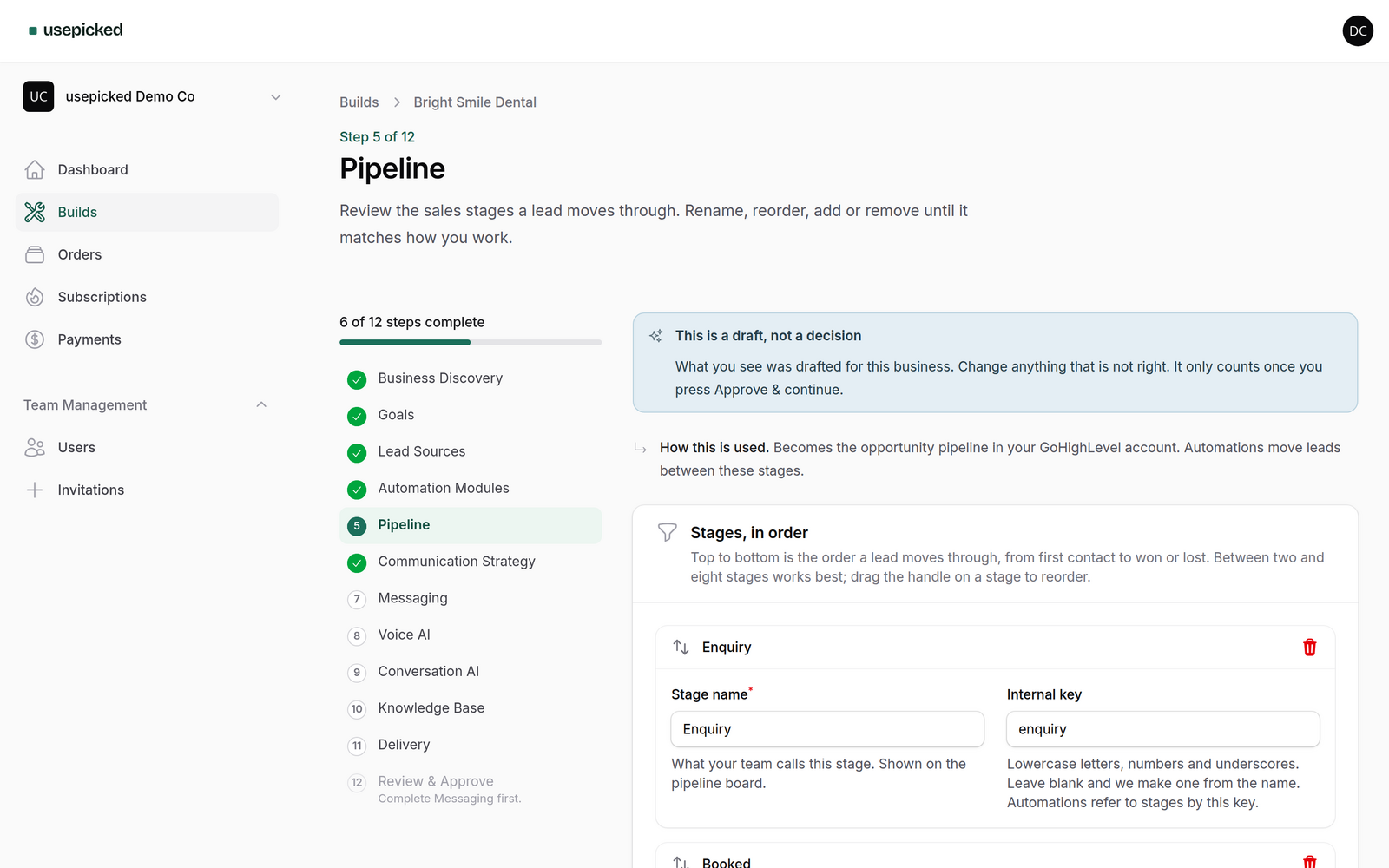
Every message read and approved before it is installed
Initial responses, follow-ups, appointment confirmations and reminders, missed-call texts, review requests and reactivation messages are drafted per module from the business profile.
Edit inline, ask for a shorter, longer or different-tone rewrite, and approve item by item. Earlier versions are kept, and only approved text is installed, word for word.
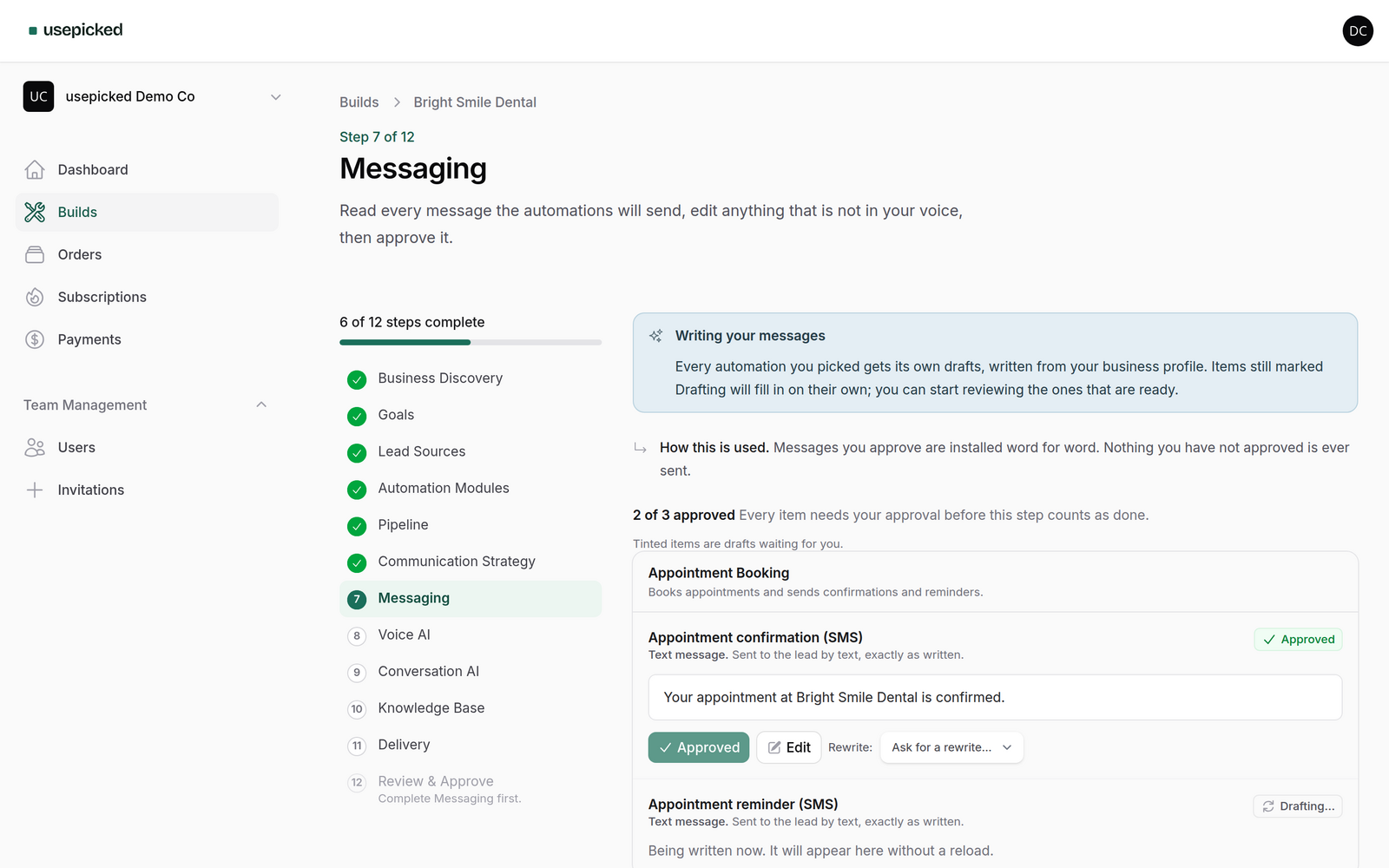
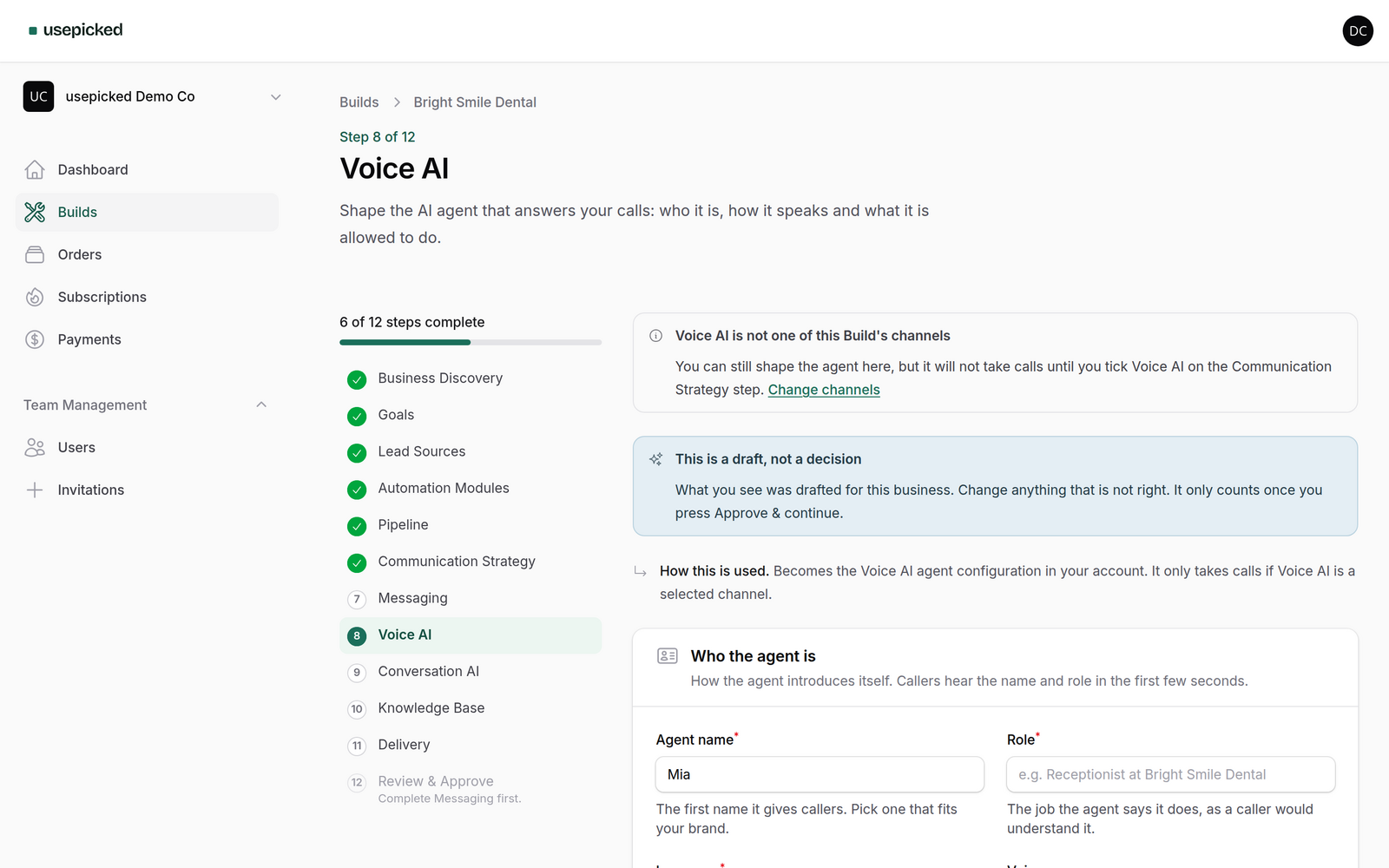
Voice AI and Conversation AI, configured from the same profile
Choose Voice AI or Conversation AI as a channel and the wizard adds a step for each: name, role, language, greeting, objective, qualification questions, allowed actions, transfer rules and working hours, all drafted and all editable.
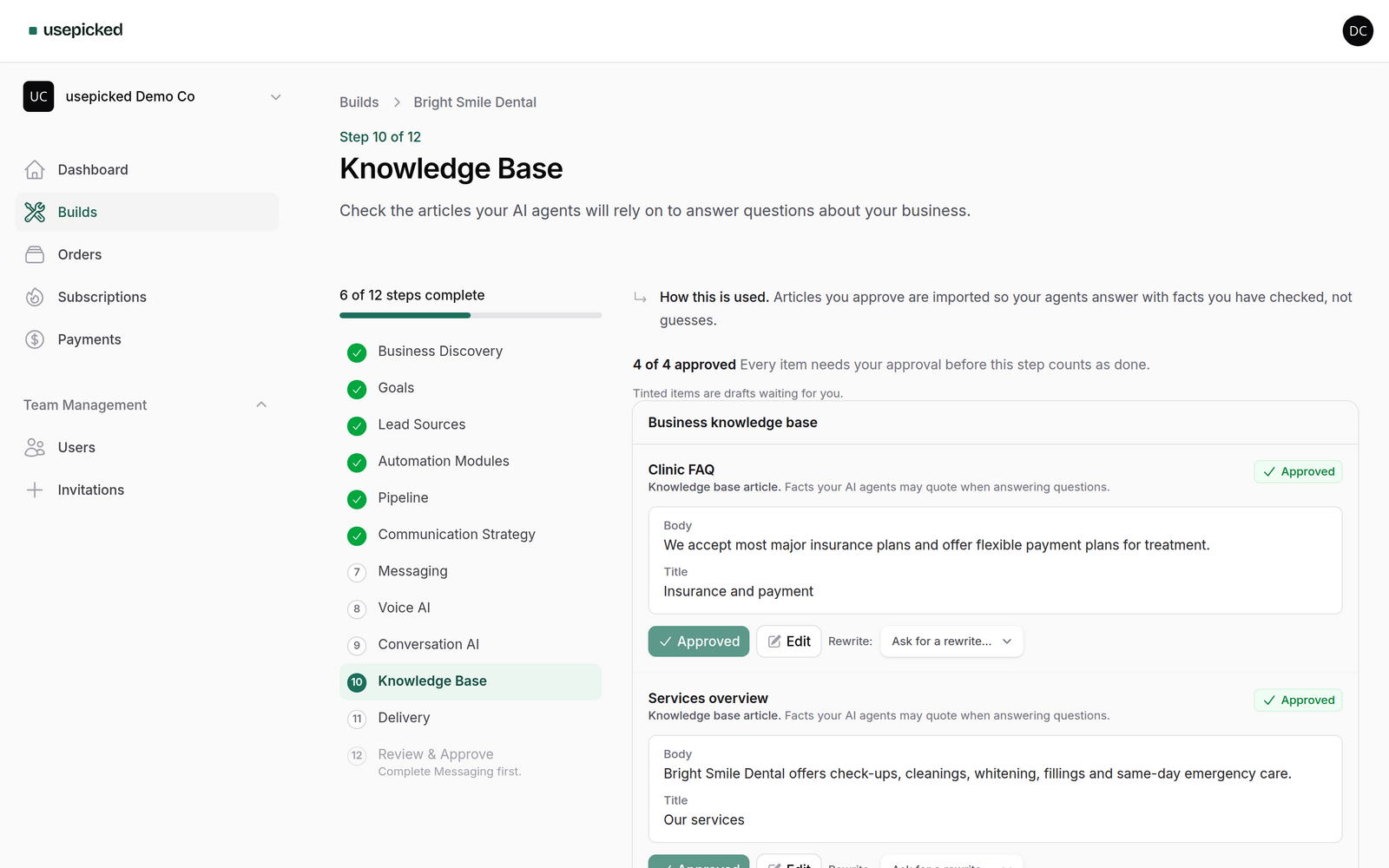
A knowledge base is generated from the confirmed website data and your answers, so the agents answer with facts you have checked rather than guesses.
One approval, one versioned specification
The Review step shows everything you confirmed in one place. Approving compiles it into an immutable, versioned Build specification, the only thing provisioning ever reads.
Leave a Build at any step and it reopens exactly there, with all data intact, days or weeks later.
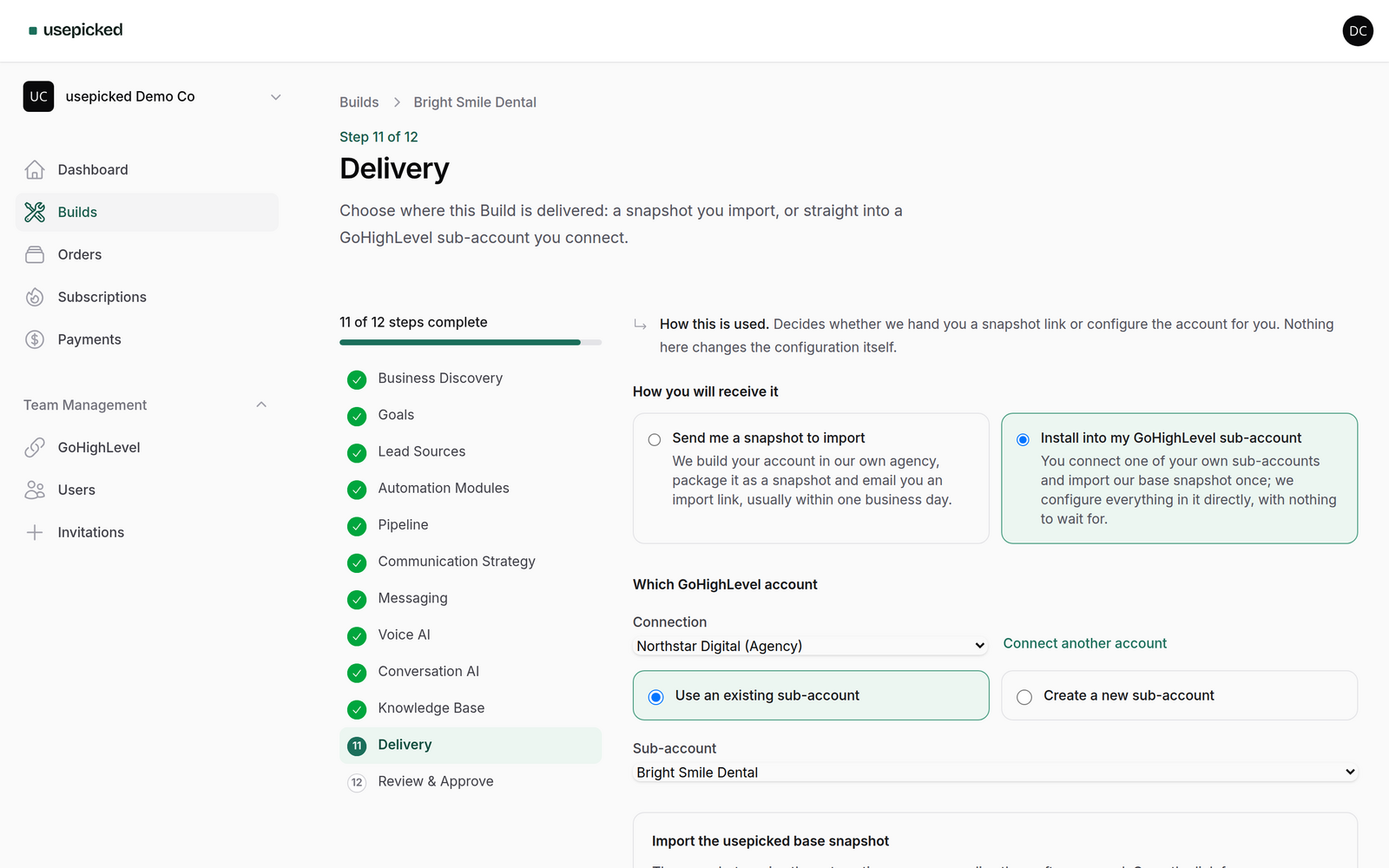
Choose how it arrives: a snapshot, or straight into your sub-account
The Delivery step offers two routes. A snapshot to import works with any GoHighLevel agency. A connected sub-account skips the packaging wait: pick one of your sub-accounts or create it from here, load our base snapshot once, and the approved Build is written straight into it.
The choice sits outside the configuration, so switching routes never changes what you approved.
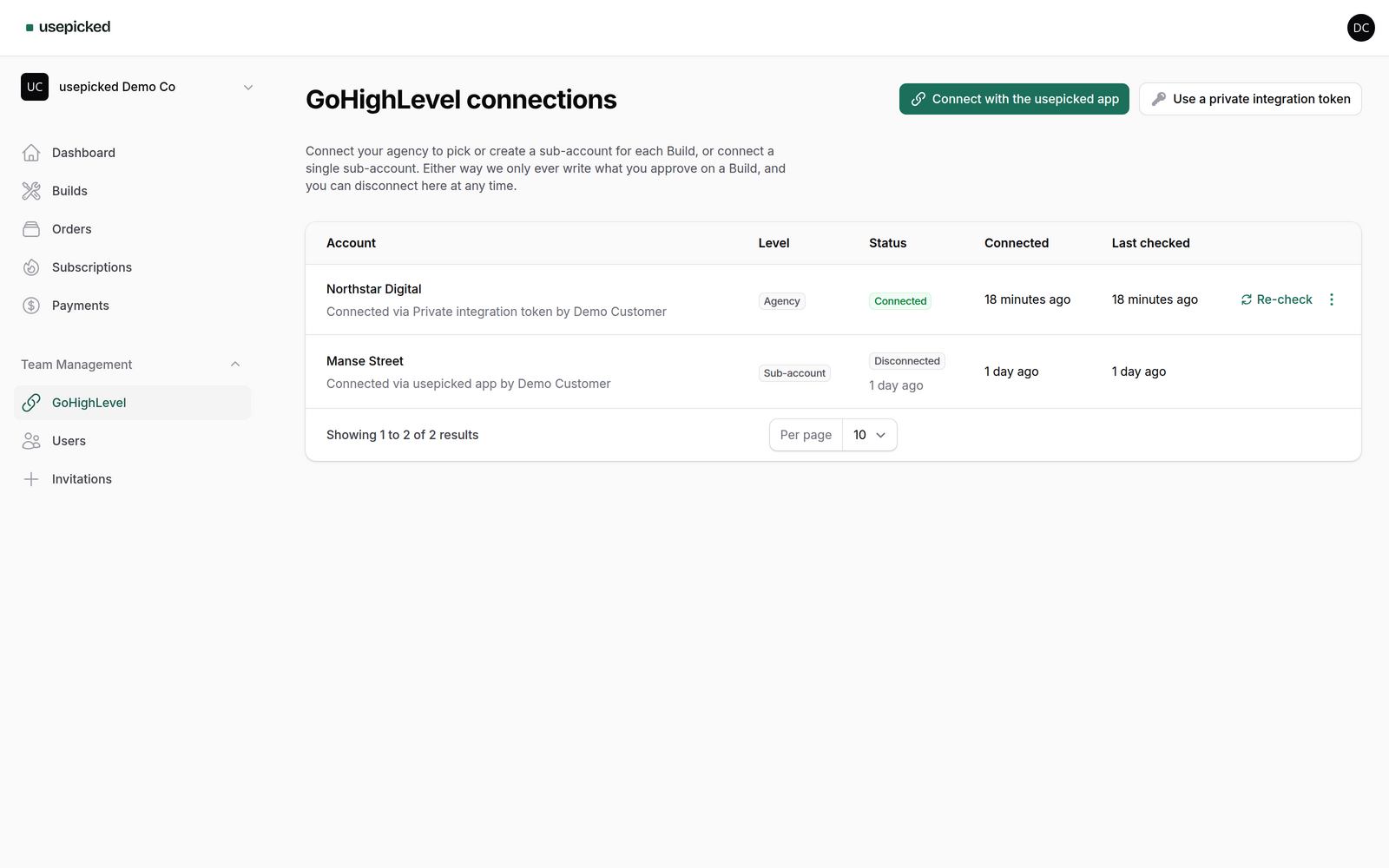
Connect your agency with one click, or with a private token
Install the usepicked app from GoHighLevel and the connection appears here with its access renewed for you. Prefer a credential you control? Paste a private integration token; we verify it live before storing it and list the exact scopes to tick.
Re-check, refresh installed sub-accounts or disconnect at any time. Uninstalling the app in GoHighLevel revokes the connection on our side within seconds.
Run the whole thing from the GoHighLevel sidebar
The installed app adds usepicked to the left navigation. Your GoHighLevel identity signs you into the right workspace, agency owners and admins arrive as admins, and inside a sub-account you see only its Builds with new ones pre-targeted at it.
Checkout and the install screen open in a new tab, because neither belongs inside a frame. Everything else runs in place.
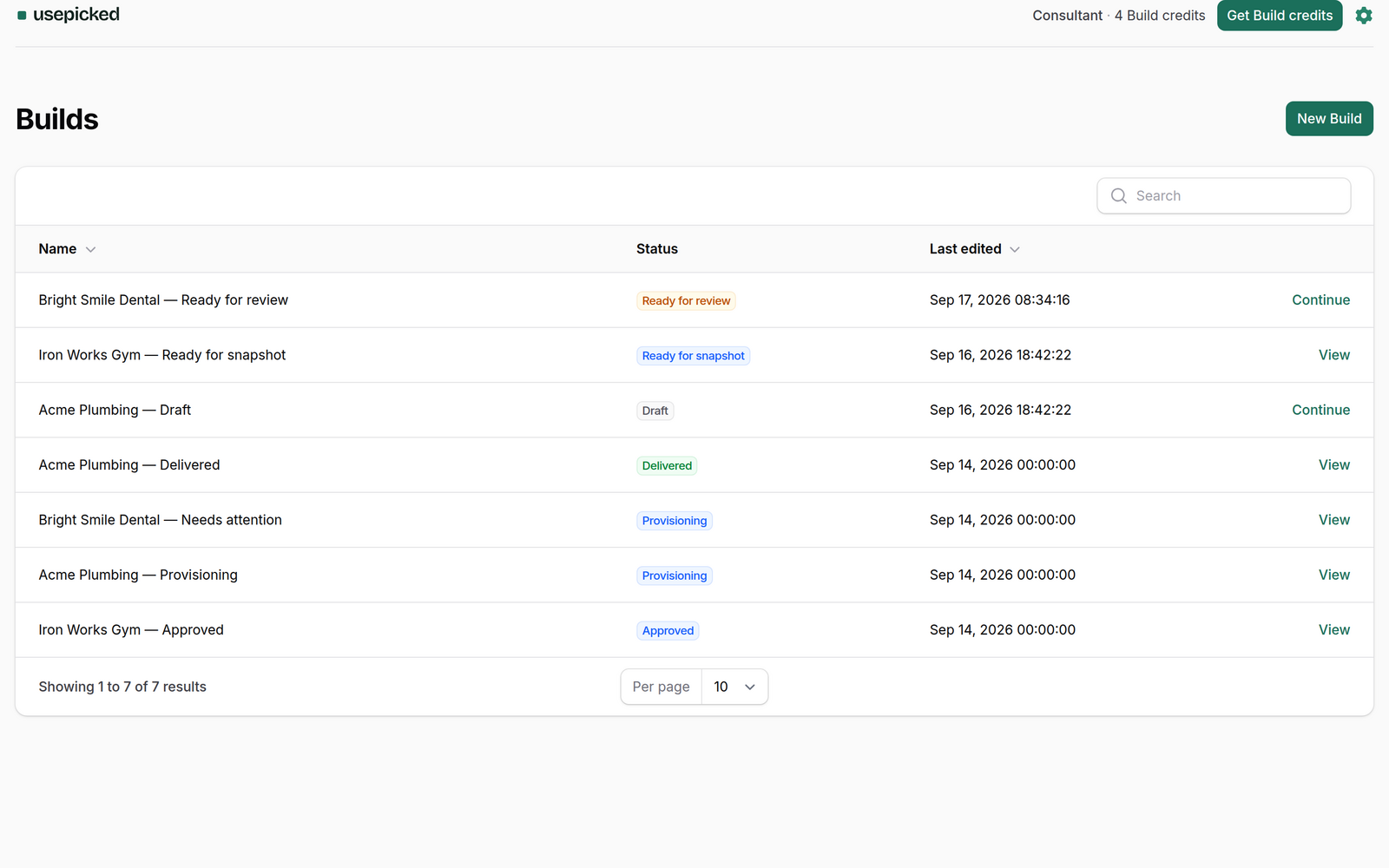
Built in GoHighLevel. Delivered as a snapshot you own
Provisioning runs as an ordered set of retryable steps against a temporary sub-account in our agency, built only from the approved specification. Steps retry on their own and resume from where they stopped, so a failed API call never means starting over.
You follow progress as five plain stages in the workspace. When the snapshot is packaged, the import link appears there and in your inbox, and the temporary sub-account is removed after delivery.
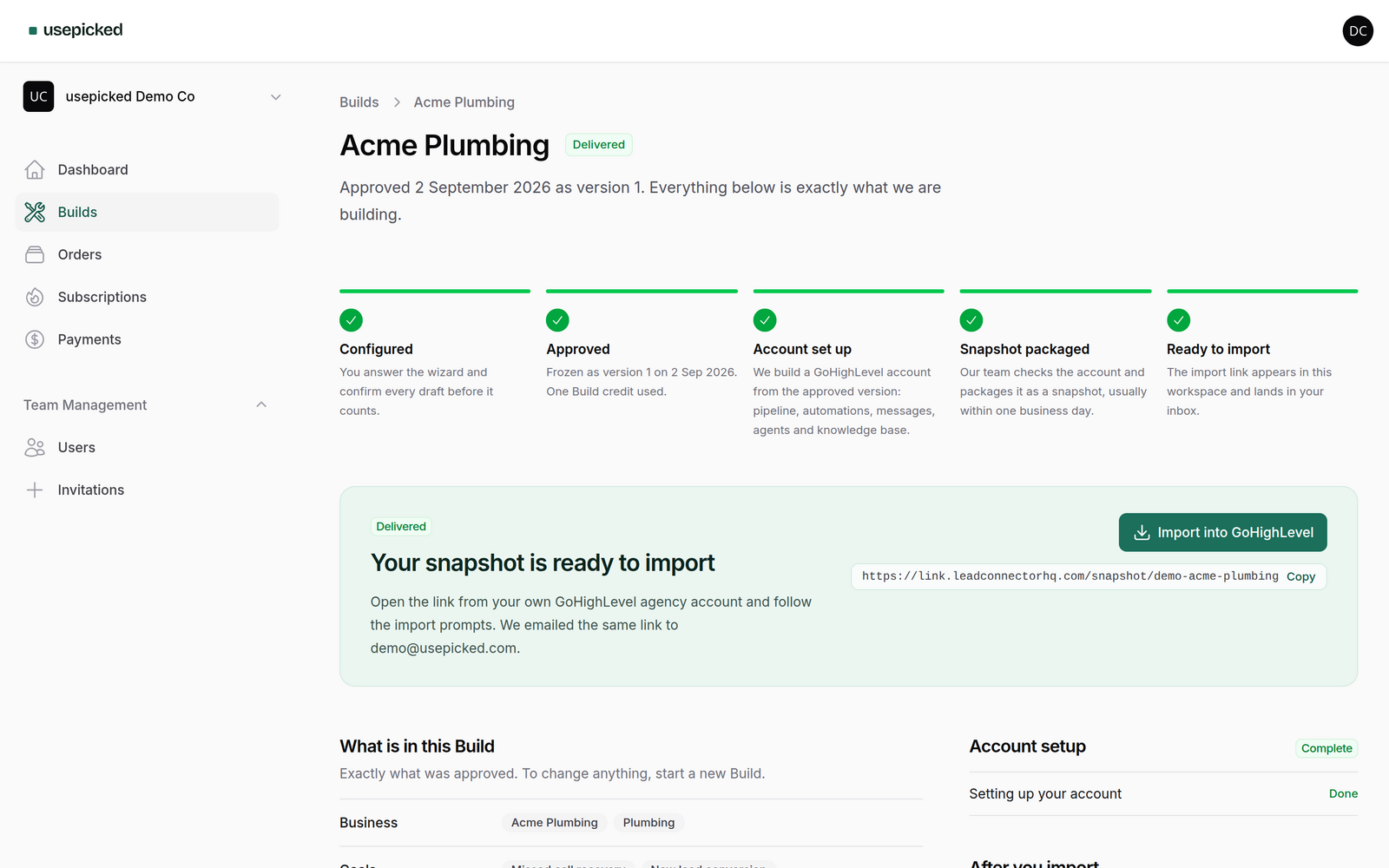
Honest about what a snapshot cannot carry
Snapshots transfer structure, not connections: phone numbers, email sending domains, calendars and Google Business Profile have to be connected inside the destination account.
Each Build gets a checklist with only the items its modules need, why each one is needed, and a link to the right GoHighLevel documentation, so the client goes live without a support ticket.
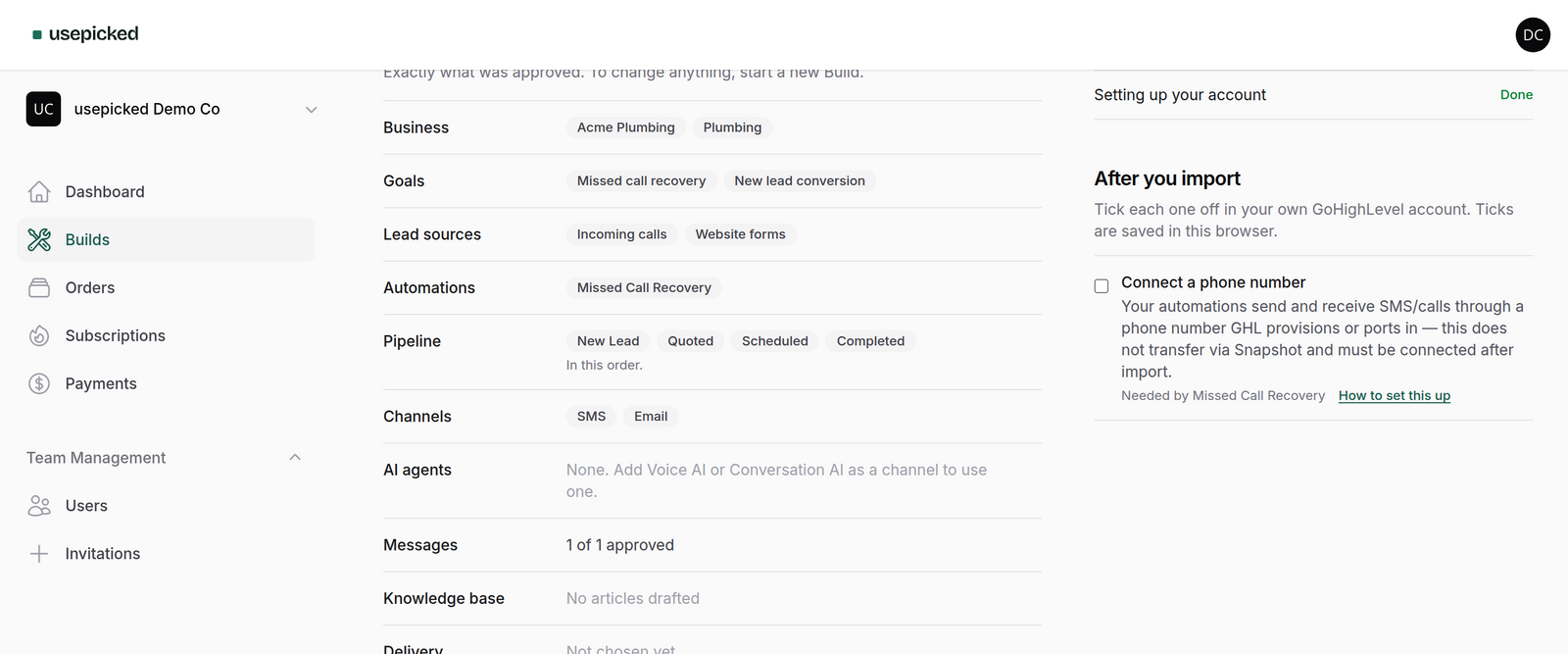
Credits, plan features and every Build in one place
See how many Build credits are left in the period and how many are banked, which features your plan unlocks, and pick up the last open Build with one click.
Invite teammates into your workspace with view or manage permissions, so a consultant and a client can work on the same Build.
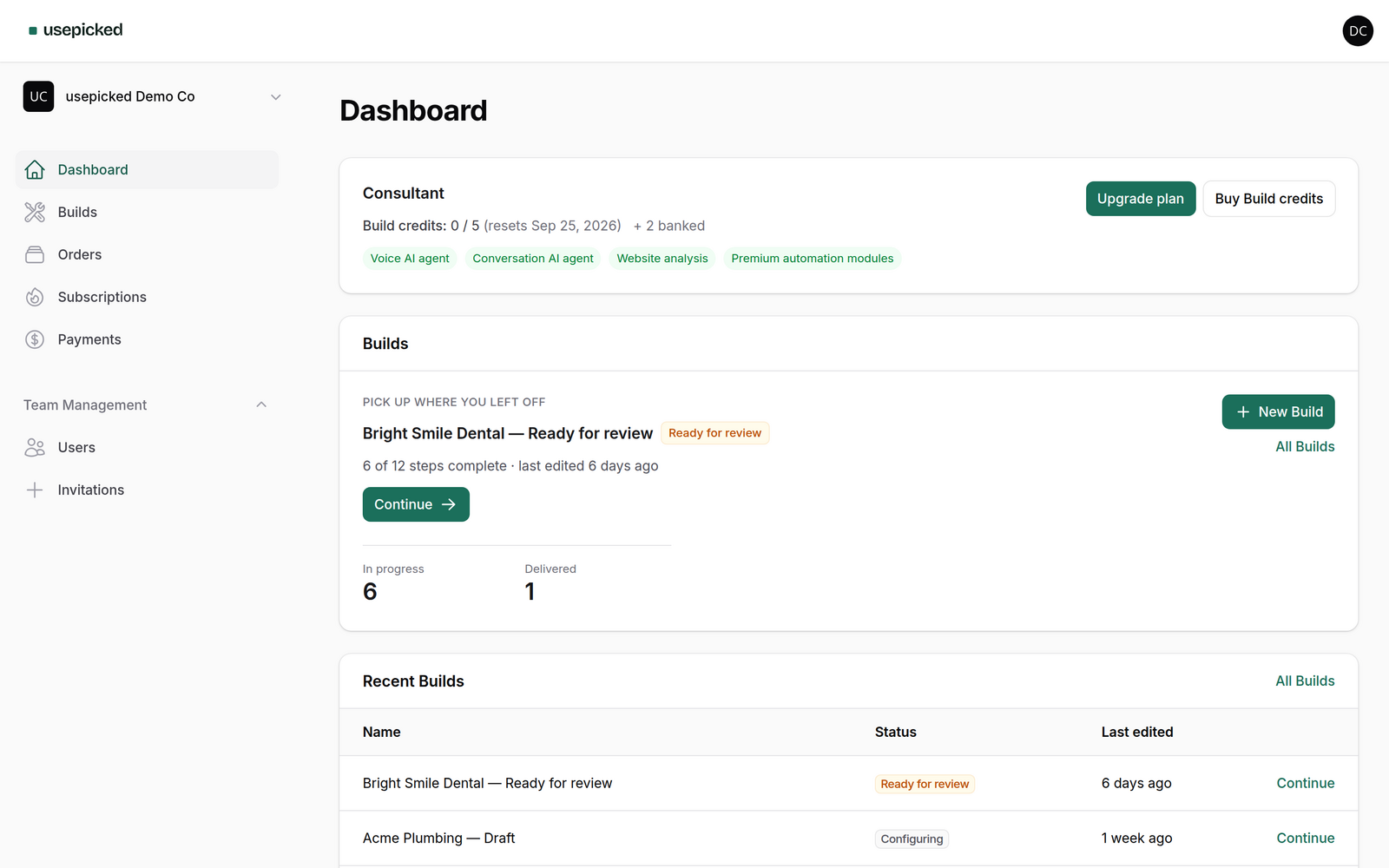
The module catalog
Every module is a proven GoHighLevel workflow from our master snapshot. Keep one and the Build gets its message drafts and its activation items.
Lead Management 2
-
Instant Lead Response
Responds to a new inbound lead within seconds by SMS and email.
-
Lead Qualification
Asks qualifying questions and scores a lead before it reaches a human.
Calls 1
-
Missed Call Recovery
Texts back callers whose call was missed, and reopens the conversation.
Booking 2
-
Appointment Booking
Books appointments and sends confirmations and reminders.
-
No-Show Recovery Premium
Re-engages contacts who missed a booked appointment.
Sales 2
-
Follow-Up Nurture
Keeps an unconverted lead warm with a paced SMS and email sequence.
-
Quote Follow-Up Premium
Chases an outstanding quote before it expires.
Retention 3
-
Customer Win-Back Premium
Brings a past customer back with a targeted offer.
-
Dormant Lead Reactivation Premium
Reopens conversations with leads that went quiet.
-
Review Requests
Requests a public review after a job is marked complete.
Built for the people who set up GoHighLevel for others
Agency operators
Onboarding several clients a month. Compress a 4 to 20 hour setup into a questionnaire and a review, and give every client the same quality bar.
GoHighLevel consultants
Selling setup as a service. usepicked is the production tool: resume a Build around client feedback, deliver a snapshot into any agency, and keep the margin.
Business owners on GoHighLevel
Already paying for GoHighLevel and wanting a personalised system without hiring an agency. Answer the wizard, approve the drafts, import the snapshot.
Built to be trusted with a client account
usepicked is not a CRM and never becomes one. GoHighLevel is the runtime; usepicked is discovery, configuration, provisioning, packaging and delivery.
- AI never touches GoHighLevel
- AI writes drafts. Drafts are validated against a schema, then approved by you, then compiled into the specification. Only the approved specification is provisioned.
- Nothing is confirmed by default
- Extracted website data, pipeline stages, messages, agent settings and articles all wait for an explicit tick. Regenerating never destroys an earlier revision.
- Your agency, your snapshot
- Import the snapshot into any GoHighLevel agency you control. You and your clients never become sub-accounts of ours, and the temporary account we built in is deleted after delivery.
- Immutable, audited, resumable
- Approved specifications cannot be edited. Every status change is recorded. Provisioning steps are idempotent and individually retryable, so a failed API call never loses a Build.
- Isolated workspaces and encrypted credentials
- Every Build, specification, snapshot and connection is reached only through your workspace. GoHighLevel tokens are encrypted at rest and never written to logs.
- Connections you control
- Install the app or paste a private integration token; the scopes are listed before you agree, and nothing is written until you approve a Build. Disconnecting here or uninstalling in GoHighLevel revokes access within seconds and never changes a Build's status.
- Safe website analysis
- We only crawl the address you give us, within page and size limits, and treat the page text as untrusted input: it can propose facts, never instructions.
Pay per Build, or subscribe for a monthly allowance
A Build credit is used when you approve a Build, not when you start one. Subscription credits reset every month; purchased credit packs never expire and are used only after the monthly allowance.
Free, no card required
Start on the free tier and buy Build credits one at a time. Upgrade when the monthly allowance pays for itself.
- Buy Build credits one at a time
- AI website analysis
- Conversation AI agent
- All core automation modules
Build credit packs
For occasional Builds, or to top up a subscription in a busy month. Credits are banked and never expire.
1 Build credit
One complete Build, delivered as a GHL snapshot. Never expires.
- 1 Build credit
- Credits never expire
- Usable on any plan, including Free
5 Build credits
Five Builds at a lower price per Build. Never expire.
- 5 Build credits
- Credits never expire
- Usable on any plan, including Free
10 Build credits
Ten Builds at the lowest price per Build. Never expire.
- 10 Build credits
- Credits never expire
- Usable on any plan, including Free
Questions agencies ask before their first Build
Anything else? Write to drserhii@gmail.com and a person answers.