28/08/2026 · Guides
What a GoHighLevel snapshot can and cannot carry
Snapshots copy structure, not connections. The full list, why the gap causes silent failures, and the order to activate a delivered Build in.
By The usepicked team
A GoHighLevel snapshot is the closest thing the platform has to a "copy this whole account" button, and it is the way usepicked delivers every Build. It is also the source of most first-week support tickets, because people expect it to carry more than it does. This is the list.
What a snapshot carries
A snapshot copies the structure of a sub-account into another one:
- Pipelines and their stages
- Workflows, including triggers, steps, conditions and the message templates inside them
- Custom fields and custom values
- Email and SMS templates
- Calendars as configured objects (but not the connected Google or Outlook account behind them)
- Funnels, websites and forms
- Conversation AI and Voice AI agent configuration and knowledge base content, to the extent the destination agency's plan supports those features
- Tags, trigger links and similar configuration
In other words, everything that can be described without reference to a specific phone line, mailbox or third-party login.
What a snapshot does not carry
Anything bound to an account, a person or an external service stays behind:
- Contacts, conversations and opportunities. A snapshot is a template, not a data export. This is a feature when the source is a temporary build account, which is exactly why usepicked builds in one.
- Phone numbers. Numbers are provisioned or ported per sub-account. Until one is connected, every SMS step and every missed-call trigger has nothing to send from.
- Email sending domain. Domain verification is DNS, which lives with the destination account. Emails from an unverified domain either fail or land in spam.
- Calendar connections. The calendar object copies; the link to the client's Google or Outlook calendar does not. Booking automations cannot check availability until it is reconnected.
- Google Business Profile, Facebook and Instagram. OAuth connections never transfer. Review-request automations need the profile connected to know where to send people.
- Payment integrations, API keys and webhooks to other tools. Same reason.
- Users and their permissions. Team members are added in the destination account.
Why this matters more than it looks
The gap is not the list itself; every experienced agency knows it. The gap is that the missing pieces are different for every setup. A Build with only Instant Lead Response and Follow-Up Nurture needs a phone number and a sending domain. Add Appointment Booking and it needs a calendar. Add Review Requests and it needs Google Business Profile. A generic "post-import checklist" PDF lists all of them, the client does not know which ones apply, and the agency ends up on a call explaining it.
The failure mode is quiet. Nothing errors. The automations simply never fire, and the client concludes the system does not work.
How usepicked handles it
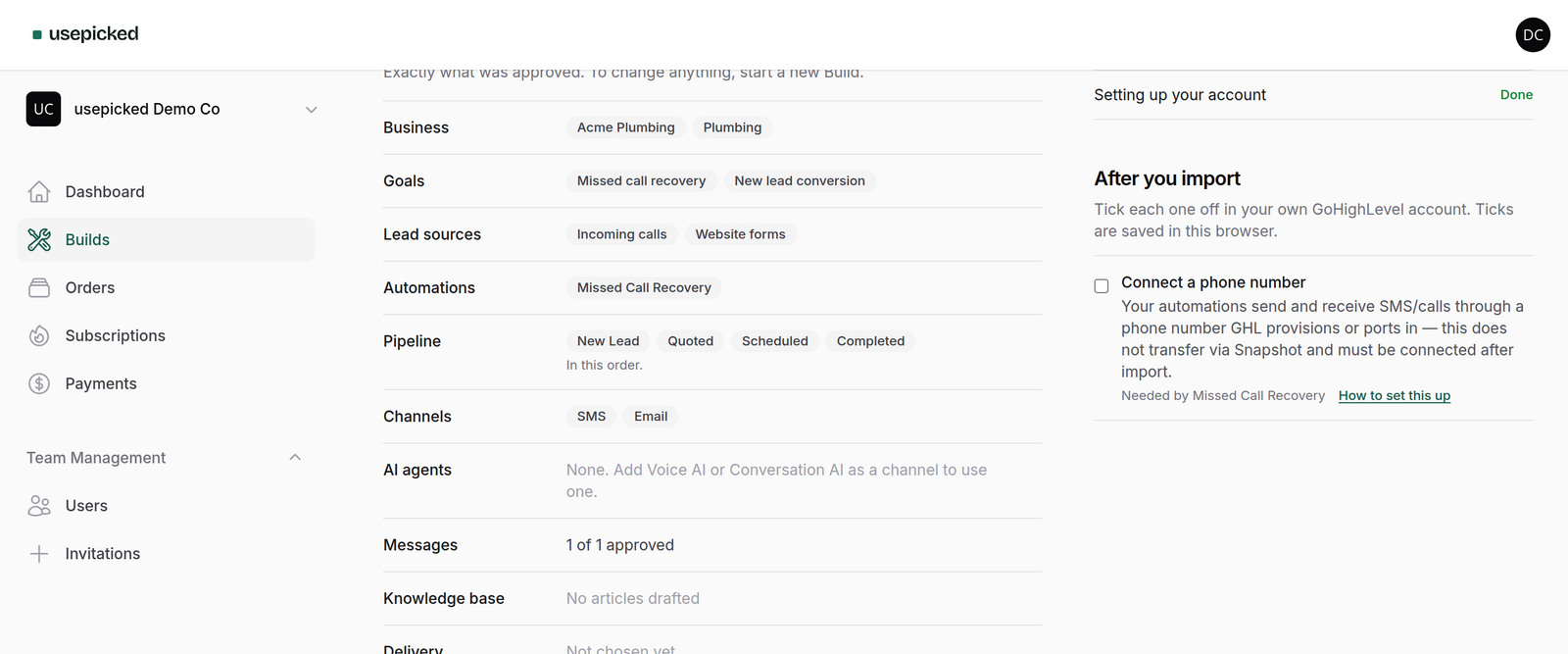
Every automation module in the usepicked catalog declares the integrations it depends on. When a Build is approved, the specification aggregates those into activation requirements, and the delivered Build shows an activation checklist with only the items this Build needs. Each item says what to connect, why this Build needs it (with the modules that depend on it named), and links to the relevant GoHighLevel documentation. Ticks are stored in the browser so a client can work through it at their own pace.
The checklist is generated from the approved specification, not written by hand, so it cannot drift from what was actually built. Remove a module before approval and its checklist items disappear with it.
A sensible order after import
- Import the snapshot into the destination sub-account from your agency view. Do not start connecting things before the import completes; some connections attach to objects the snapshot creates.
- Phone number first. Most modules depend on it, and number provisioning can take longer than everything else combined if porting is involved.
- Sending domain. DNS changes need propagation time, so start them early and verify later.
- Calendar and Google Business Profile, if the checklist lists them.
- Send a test lead through the real lead source (a website form submission, a missed call) and watch it move through the pipeline. Only then hand the account to the client.
Done in that order, activation of a delivered Build is typically well under an hour, and none of it is guesswork.